
Run Repetitive Work Without Human Hands
Centralized, deterministic browser automation: it runs repetitive work such as scheduled tasks, data entry and screen scraping without human intervention, in a predictable way.
Not "Sometimes It Works": the Same Result Every Time
Most automation attempts end in a fragile reflex: it works one day, then silently breaks the next when a UI update shifts a field by a single pixel. RiverAI RPA aims for the exact opposite: it is built on a step-by-step defined, deterministic orchestration engine. Every run proceeds in the same order, with the same verification steps: before moving to the next step, it checks that the expected screen has actually loaded and the expected field is actually visible.
This is not screenshot scraping or pixel simulation. The automation runs through a real browser engine; the target system sees a real user clicking, typing and navigating between pages, not a robot. The practical consequence matters: no special integration, API or access permission needs to be opened on the target system; RiverAI works through the very same interface an employee who already uses that system works through.
Consider, for example, a task that checks order status on a supplier portal every morning and records it in an Excel file: the engine first logs into the portal, verifies that the login screen has actually loaded, moves to the order list page, verifies that the list has populated, and only then starts reading the data. If the expected screen doesn't appear at any step, the engine doesn't guess and carry on. It stops.
Multiple Tasks at Once, Monitored from a Single Panel
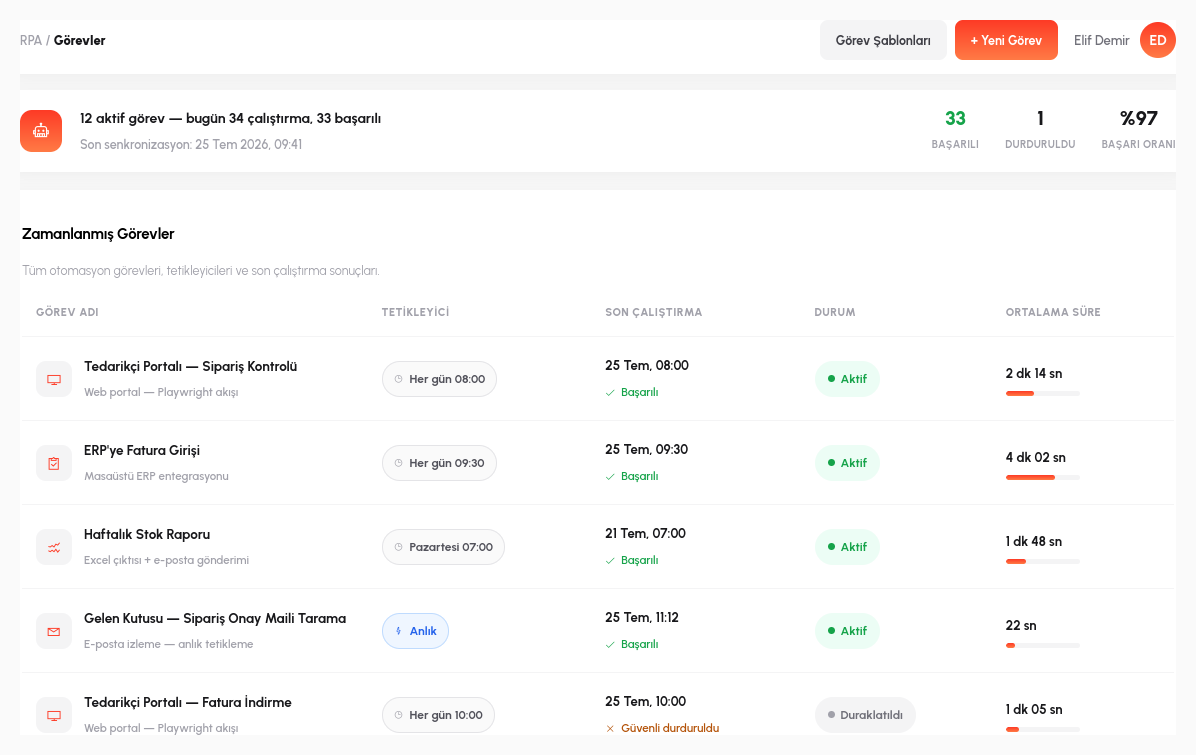
Tasks are triggered in two ways: scheduled (starting automatically at a set time each day) or on demand (triggered at that moment by a user or a process step). Multiple tasks can run simultaneously in independent parallel sessions; while one task waits for a page to load, the other tasks don't stall or wait their turn because of it. Each session proceeds in its own browser context.
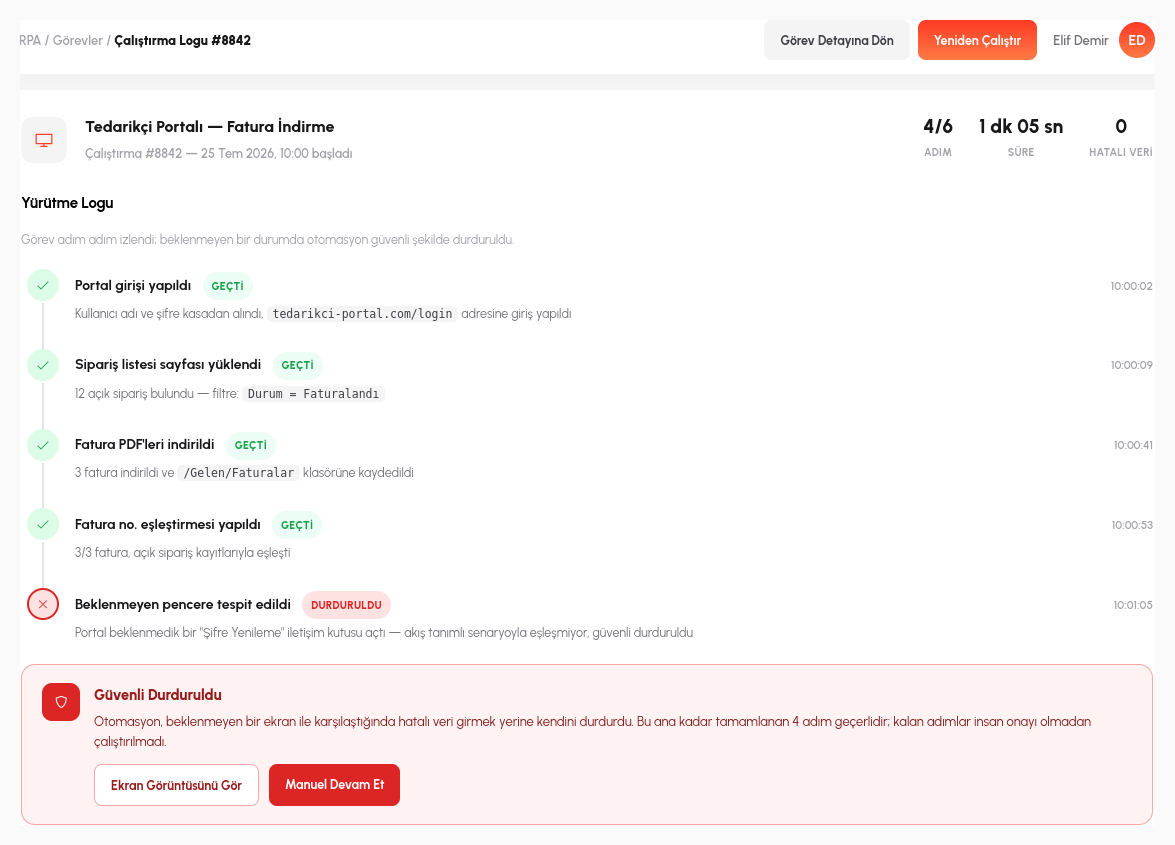
A step-by-step log is kept for every run: which step started when, and which verification it passed, can be traced retrospectively. And this is where the engine's most critical behavior kicks in: safe stopping. If the target screen changes unexpectedly (for example, a confirmation dialog that isn't part of the flow, or an error message appearing at an unexpected moment), the engine doesn't ignore it and silently keep producing bad data; it stops the task where it stands and sends an alert to the relevant person.
For example, if a task performing bulk invoice entry on an accounting portal is interrupted by an unexpected "session expired, please sign in again" dialog, the engine doesn't mistake that screen for part of the flow and click at random; it stops, logs which step it was on and what it encountered, and notifies the responsible person. Other tasks running at the same time are unaffected and continue in their own sessions.
- Deterministic Orchestration: every run proceeds in the same order; before moving to the next step, it verifies that the expected screen has actually loaded.
- Real Browser Engine: no special integration or API needs to be opened on the target system; the automation works through the interface like a real user.
- Parallel Sessions: multiple tasks can run simultaneously in independent parallel sessions, triggered on a schedule or on demand.
- Safe Stopping: if the target screen changes unexpectedly, the engine doesn't carry on by guessing; it stops the task and alerts the relevant person.
- Process Engine Extension: RPA is triggered from a process step and recorded under the same audit trail; no separate license or monitoring panel is required.
The Same Audit Trail as the Process Engine
Scheduled Tasks
Automations triggered automatically at set times.
Real Browser Engine
Interacts with the target system like a real user.
Parallel Sessions
Multiple tasks running concurrently at the same time.
Safe Stopping
Stops and alerts instead of silently continuing on the unexpected.
Let's Automate Your Repetitive Work Together
In a 15-minute demo, let's bring one of your frequently repeated operations to life with RiverAI RPA.
Request a Demo