
Plan the Budget, See the Variance Instantly
Department- and project-based budget planning, expense tracking and actuals comparison; when variances occur, the relevant manager is notified automatically.
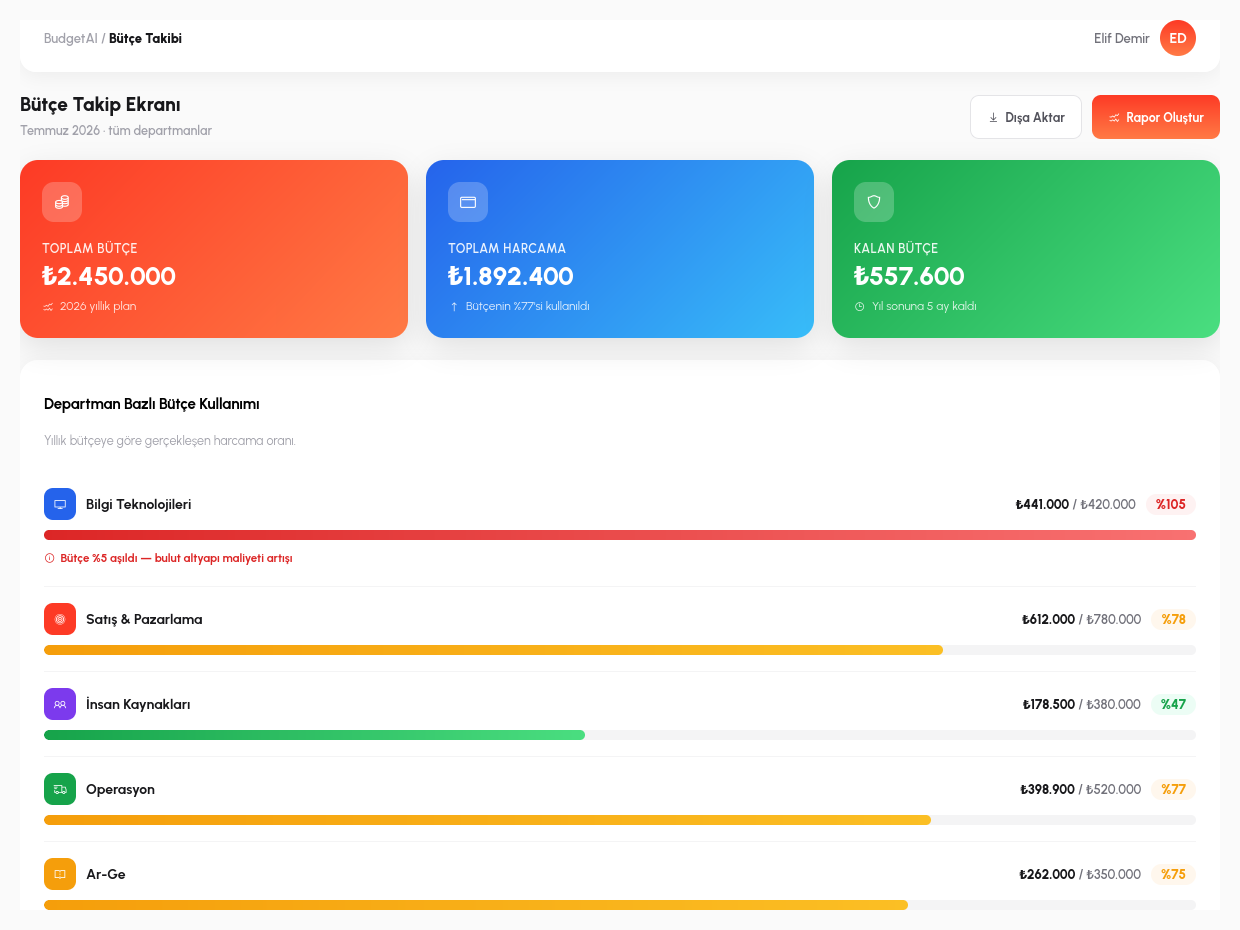
Budget and Actual Spend, Side by Side
You define a budget plan per department or cost center: the period total, line-item breakdowns, and which expense type counts under which heading. This plan isn't a target left on paper; it is a live reference point continuously compared against the organization's actual spending flow.
Actuals data is not entered by hand: approved invoices arriving from the E-Invoice module automatically land in the relevant department and cost center, and the budget comparison is updated instantly. A department manager sees the answer to "how much have we spent this month, and how much is left" without waiting for month-end or requesting a report from the accounting team, because the figure was posted to the budget table the moment the invoice was approved.
When an expense line approaches its budget limit, the system doesn't wait: a budget overrun alert automatically goes to the relevant manager. For example, when 90% of a cost center's monthly budget has been spent, the manager learns this through a notification, not after the budget has actually been exceeded, but as it approaches the limit, while there is still a chance to intervene.
Reading Reports, Not Writing Them
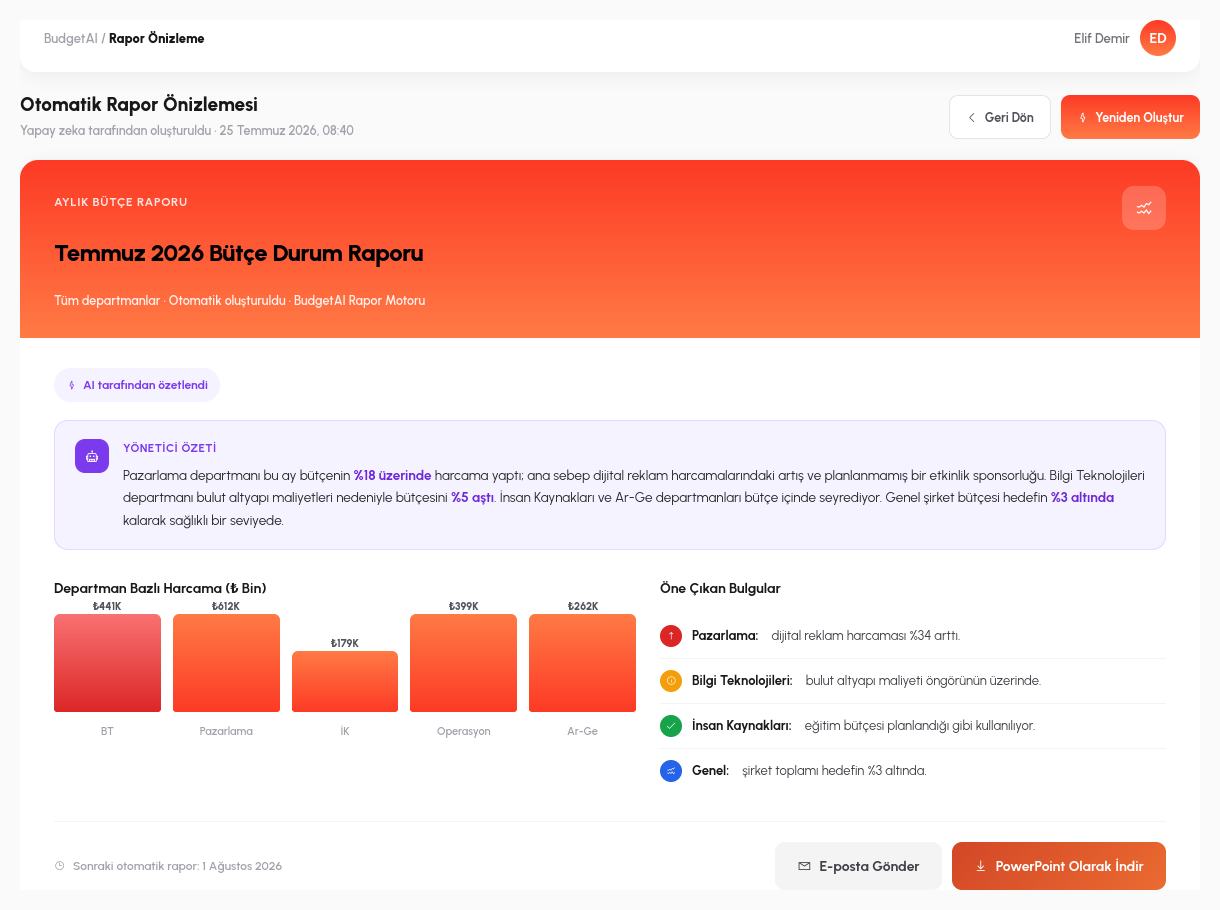
BudgetAI doesn't leave interpreting the numbers table to you: it explains the variance in natural language. Instead of seeing a row like "marketing: budget 100,000, actual 118,000" in a table and investigating the gap yourself, the system tells you directly: "The marketing department is 18% over budget this month; the main driver is digital advertising spend." The report includes not only the size of the variance but also which line item is driving it.
This report can be generated automatically in corporate presentation format (PowerPoint-compatible); a manager doesn't have to prepare separate slides to present to the board or senior management; the table arrives already turned into a narratable summary. Last-minute slide preparation before a meeting is largely eliminated by the summary BudgetAI produces ready-made.
An audio (TTS) summary of the report is also supported: on a busy day, instead of sitting at a screen studying the table, a manager can follow the report by listening: a way to stay on top of the budget in the car, between meetings, or while out of the office.
- Production Budget: alongside the operational expense budget, it plans production/operating costs (raw materials, labor, manufacturing overhead) as separate line items and compares them with actuals.
- What-if Analysis: tries scenarios like "what happens by year-end if we increase the advertising budget by 20%" without changing real data, and shows the result instantly.
- Benchmarking: puts cross-department, cross-period (this month/last month, this year/last year) and budget/actuals comparisons side by side on a single screen.
- Projection: calculates the estimated year-end/period-end amount in advance based on the current spending rate: a warning you see before the variance materializes.
- Natural-Language Reports: summarizes the cause of a variance in plain sentences without you having to interpret the table, and can be listened to via audio (TTS).
Budgeting, Right Inside Your Processes
Expense Integration
Real-time budget deduction through the expense management process.
Variance Alerts
Automatic manager notification when a threshold is exceeded.
Automatic Reports
PowerPoint-compatible budget status report generation.
Audio Summary
AI-powered report listening support.
Production Budget
Plans raw materials, labor and manufacturing overhead as separate line items and compares them with actuals.
What-if Analysis
Tries scenarios without changing real data and shows the result instantly.
Benchmarking
Shows department, period and budget/actuals comparisons side by side on a single screen.
Projection
Calculates the estimated period-end amount in advance based on the current spending rate.
Let's Build Your Budget Process Together
In a 15-minute demo, let's bring your own budget structure to life in RiverAI.
Request a Demo